
Mealime closed on 21 October 2026
Looking for a Mealime alternative?
MealStack is a free meal planner with no paywall. Plan your week, shop from one shared list and bring your favourite recipes along by pasting their links. And your whole household plans together.
For iPhone, iPad, Android and the web. my.mealstack.app
Written with AI help and checked by us.
What a Mealime replacement needs
Most people who used Mealime want the same few things from the next app. Here is what MealStack does for each.
| You need | In MealStack |
|---|---|
| Free, without a subscription | Free, no paywall, no ads. |
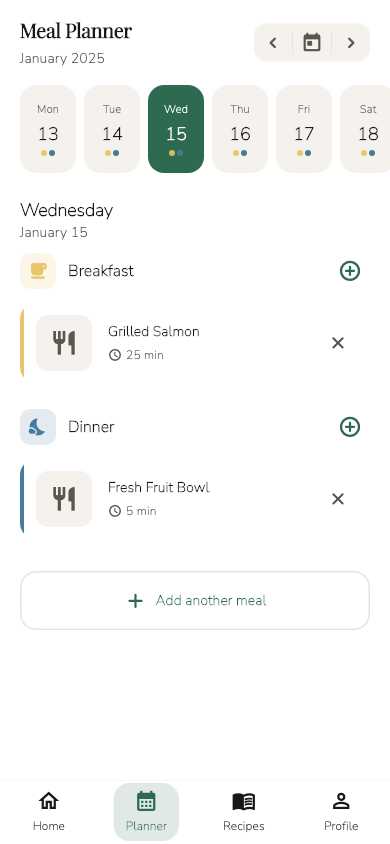
| A weekly meal plan | Breakfast, lunch and dinner for every day, from your own recipes. |
| A shopping list from the plan | Add a meal's ingredients to the list; tick them off in the shop. |
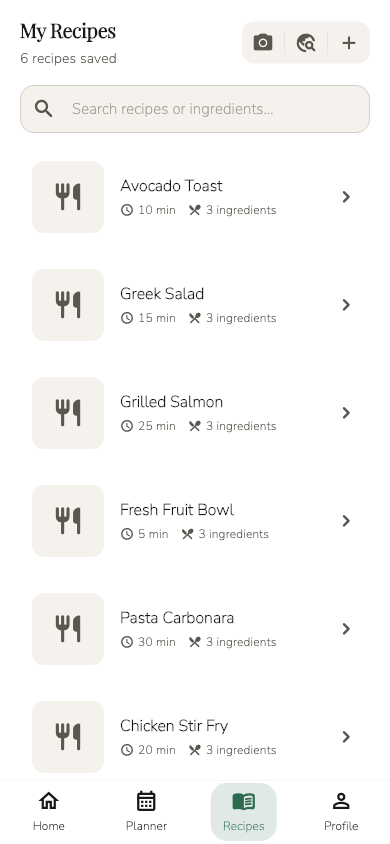
| Your own recipes | Paste a link from any recipe website, take a photo of a cookbook page or type it in. |
| Easy cooking | Cook mode: one step at a time, ingredients on screen, servings scaled. |
| Planning with your family | One shared plan and one shopping list on every phone; decide who cooks which night. |
| Your phone and your computer | iPhone, iPad, Android and the web, synced. The apps work offline. |
What you get in MealStack
Weekly meal planner
Put breakfast, lunch and dinner on every day of the week, straight from your recipe collection.
Shared shopping list
Add a planned meal's ingredients to one list for the whole household. Tick items off in the shop, and everyone sees what's still to buy.
Import recipes from the web
Paste the link to a recipe on a recipe website and MealStack saves its ingredients and steps. Recipes from a cookbook? Take a photo of the page.
Automatic tags and filters
Recipes are tagged automatically, like vegetarian, pasta or quick. Add your own tags and filter your recipes, and the recipe picker in the planner, by tag.
Cook mode
One step at a time, with the ingredients always on screen and the servings scaled to the people at the table.
Weekly planning reminder
Pick a day and time, and MealStack reminds you every week to plan the meals ahead.
The difference: your household plans together
In MealStack, your recipes, your weekly plan and your shopping list live in a shared circle. Invite your partner, your kids or anyone who cooks with you by sending a link. Everyone sees the same plan, can add meals and tick off the shopping, and whoever cooks tonight just opens the recipe.
Switch in three steps
- 1
Install MealStack
Get it free from the App Store or Google Play, or open my.mealstack.app in your browser, and create your account.
- 2
Import your recipes
Open a favourite recipe on the website where you found it, copy the link and paste it into MealStack. Repeat for each recipe you want to keep.
- 3
Invite your family
Send the invite link to your circle. From then on you share the recipes, the weekly plan and the shopping list.
Bring your recipes along
You can't move a Mealime account, but you can rebuild your favourites in a few minutes. Start with the five meals you cook most.
Paste the link
Found the recipe on a recipe website? Copy its link and paste it into MealStack. Ingredients and steps are saved for you.
Take a photo
Printed it, or have it in a cookbook? Take a photo of the page and MealStack turns it into a recipe.
Search for it
No link and no printout? Search for the dish in the app and save a recipe that comes close.
No ideas for this week yet? Start with our free family meal plan: 5 dinners and one shopping list. See the week 1 meal plan →
Questions
What happened to Mealime?
Mealime closed on 21 October 2026. MealStack is not connected to Mealime; it is a separate, free meal planner you can switch to.
Is MealStack free?
Yes. MealStack is free, with no subscription and no paywall: every feature on this page is available to everyone.
Which devices does it run on?
iPhone and iPad (App Store), Android (Google Play) and any web browser at my.mealstack.app. Your plan syncs between them, and the apps work offline. The weekly reminder is available in the iPhone, iPad and Android apps.
Which languages is it in?
English, German, Spanish and French.
Can I bring my recipes along?
Yes, one at a time: paste the link to any recipe on a recipe website, take a photo of a printed recipe or type it in. MealStack can't import a Mealime account or export file.
Can my family use it with me?
Yes, that's what MealStack is built for. Create a circle, send the invite link, and everyone in it shares the recipes, the weekly plan and the shopping list.
Does MealStack plan the meals for me?
No. You and your family choose the meals, from your own recipes or from new ones you find with the recipe search in the app. MealStack keeps the plan, the shopping list and the cooking steps together.
Plan this week with MealStack
Free on iPhone, iPad, Android and the web.